USB Configuration
FlexKVM emulates a keyboard, mouse, and storage device via USB. You can customize the device identity — what name and vendor info appears in the target host's Device Manager.
Go to Settings → System → USB Configuration.
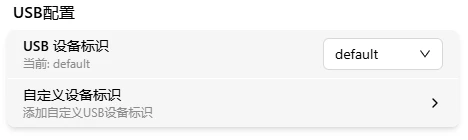
Switch Device Identity
The dropdown lists built-in identities and any custom ones you've created. After selecting, USB auto-restarts to apply the new configuration.
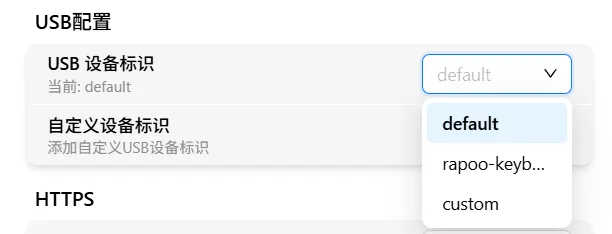
Host BIOS or OS having compatibility issues with a specific USB device? Try switching to a different preset identity.
Custom Device Identity
Click "Custom Device Identity":
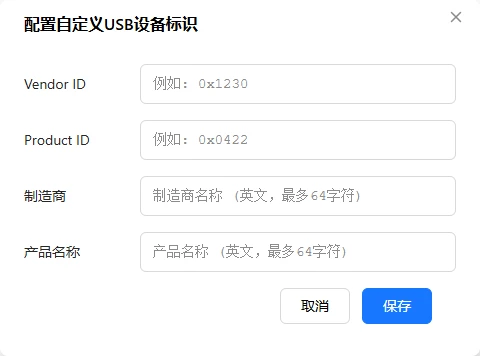
| Field | Format | Description |
|---|---|---|
| Vendor ID | 4 hex digits (0x046d) | USB Vendor ID |
| Product ID | 4 hex digits (0xc52b) | USB Product ID |
| Manufacturer | ASCII only, max 64 chars | Manufacturer name |
| Product | ASCII only, max 64 chars | Product name |
All fields required. VID/PID must start with
0x. After submitting, a custom option appears in the list — select it to apply.
USB Device Functions
FlexKVM's USB connection includes:
| Function | Protocol |
|---|---|
| Keyboard | HID Keyboard |
| Mouse (absolute mode) | HID Absolute Coordinates |
| Mouse (relative mode) | HID Relative Coordinates |
| Audio | UAC (USB Audio Class) |
| Mass storage | USB Mass Storage |
Changing the device identity affects all of the above functions.