UART Serial Terminal
Interact with target devices (routers, embedded development boards, switches) via serial console.
For embedded debugging, industrial control, and other specialized scenarios. Regular users typically don't need this.
Before You Begin
| You need | Notes |
|---|---|
| FlexKVM | Completed Quick Start wiring and network setup |
| 2.54mm Dupont wires (female) | At least 3 |
| Target device | Supports serial communication; parameters (baud rate, etc.) must be confirmed in advance |
Pinout
FlexKVM's UART interface is a 3-pin header with letter labels beside each pin:
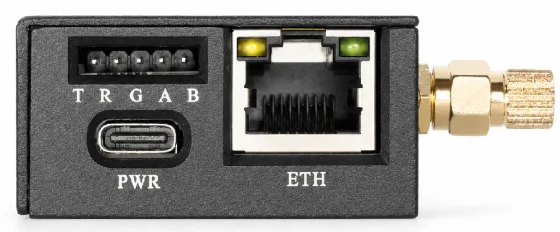
| Silkscreen | Pin | Description |
|---|---|---|
| T | TXD | Data transmit → connect to target device RX |
| R | RXD | Data receive → connect to target device TX |
| G | GND | Ground — common ground with target device |
UART cross-connect: FlexKVM TXD → target device RXD, FlexKVM RXD → target device TXD, GND interconnected. Only these three wires are needed.
Wiring
FlexKVM                 Target Device
  TXD ───────────────→ RXD
  RXD ←─────────────── TXD
  GND ──────────────── GND
Software Configuration
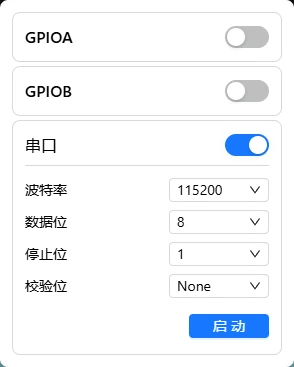
Top bar → click chip icon → IO menu → UART Serial Terminal.
Communication Parameters
Set parameters after enabling UART. Parameters must match the target device exactly, otherwise you'll get garbled output or no communication:
| Parameter | Default | Common values |
|---|---|---|
| Baud rate | 115200 | 9600, 19200, 38400, 57600, 115200 |
| Data bits | 8 | 5/6/7/8 |
| Stop bits | 1 | 1/2 |
| Parity | None | None/Odd/Even |
The default 115200 8N1 is the most common configuration for serial devices.
Start & Disconnect
Set parameters → click Start → a terminal window opens for direct interaction with the device.
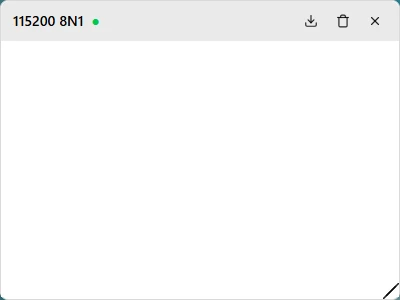
Terminal layout: top-left shows current serial configuration (e.g., 115200 8N1), status indicator next to baud rate (🟢 connected / 🔴 disconnected), right side has export log / clear / disconnect buttons.
Parameters can't be changed while connected. Disconnect first if you need to change them.
FAQ
Garbled output? → Parameters don't match the target device — baud rate mismatch is the most common cause. Verify the device's parameters and reconfigure.
Can't connect? → Confirm the target device's serial port is enabled and the wiring is correct (TXD→RXD, RXD←TXD, GND interconnected).
No response to commands? → Confirm the target device is in a state that accepts commands. Some devices only respond to serial input during specific phases.